
How to run Web Transaction Monitors one after another, not simultaneously?
Q: We have a host with 4 web transaction monitors. Every Web Transaction Monitors must login to the Web site with the same credentials. However, the website only allows one simultaneous login per account. So, if all the monitors run at the same time, we get errors. However, if they run one after another, they run fine. Is there a way to make sure that only one monitor per host runs?
A: All of the web transaction monitors are executed in separate processes. To make sure WTMs run one after another, one would need to set the maximum number of the processes to 1 as shown on the screenshot:
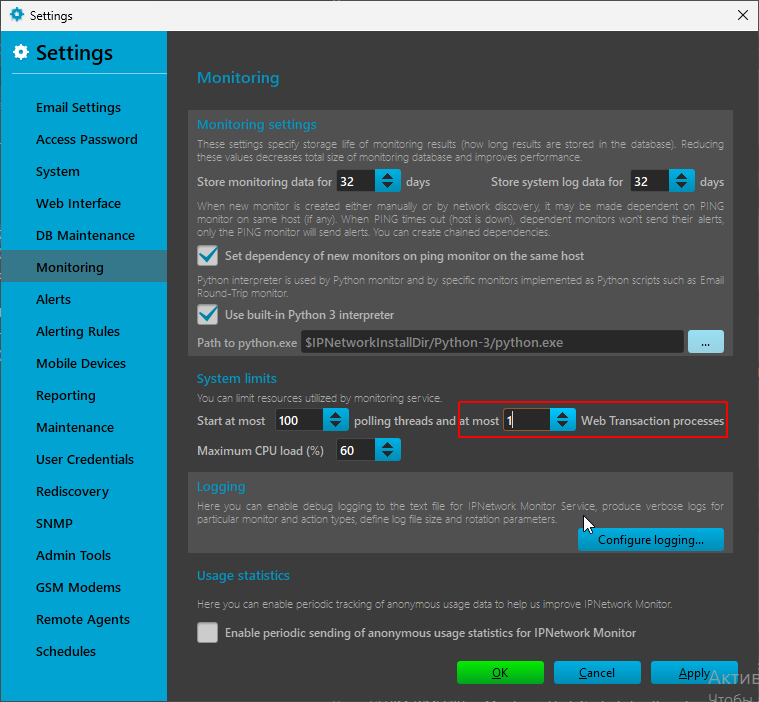
Tools -> Settings -> Monitoring tab -> Maximum number of Web Transaction processes
Note: the above will sequence all the web transaction monitors, not only those for given host.
Related topics
Check out our Knowledge Base where we answer questions regarding various topics. Set Maximum number of Web Transaction processes to 1 under Tools, Settings, Monitoring. No. Setting the maximum number of Web Transaction processes to 1 sequences all Web Transaction Monitors, not just monitors for a single host. If the target site allows only one session per account, parallel monitor runs can collide at login and produce errors even when each transaction works by itself.
Frequently Asked Questions
How can Web Transaction Monitors be forced to run one at a time?
Does this sequencing apply only to one host?
Why can simultaneous Web Transaction Monitors fail with shared credentials?