
How can I check a Web page content?
Q: I want to monitor Web site pages. How can I set up testing page(s) for presence or absence of specific content?
A: Some examples of custom monitors are installed along with IPNetwork Monitor. One of them is a script that checks content of a Web page (and extracts specified value from the page). This script (http_content.vbs) resembles file_content.vbs script: it loads the document specified by URL and looks for either count of string provided, or for the first numerical string after the string provided. It’s located in scripts folder under the name of ipnetwork_http_content.vbs and its parameters are:
<URL> mode string
An example of command line:
“http://weather.yahooapis.com/forecastrss?p=UKXX0085&u=c” F temp=
(it looks on the Yahoo weather page for London and returns air temperature at that location, in Fahrenheits)
Note: please keep in mind that running scripts can result in noticeable overhead; please specify a reasonable ‘Down state timeout’ value to ensure the script actually runs and returns useful information.
For example, you can create Custom monitor with the following parameters: 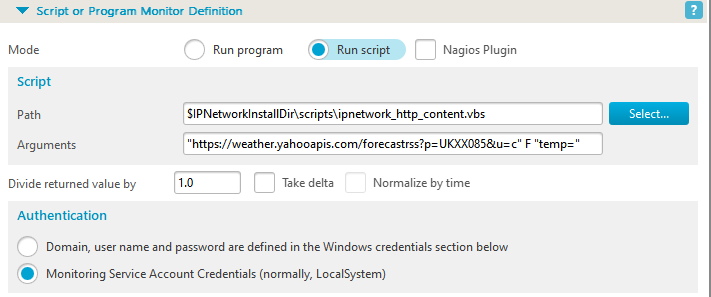
Related topics
Check out our Knowledge Base where we answer questions regarding various topics. Use the installed ipnetwork_http_content.vbs script from the scripts folder to load a URL and search for specific text or a numeric value after a marker string. The script accepts a URL, a mode, and a search string, allowing a custom monitor to check whether expected page content is present. Set a reasonable Down state timeout so the script has enough time to load the page, inspect the content, and return a useful result.
Frequently Asked Questions
Which sample script checks web page content?
What parameters does the web content script use?
What timeout should be used for scripted web content checks?