
Settings Dialog
| <Prev Schedules | Index |
MCP
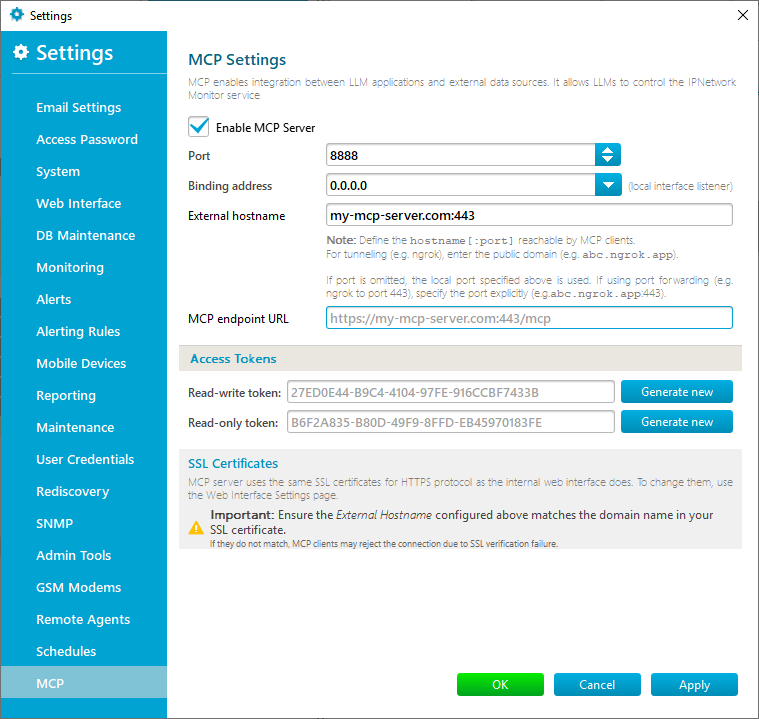
This tab contains settings for the built-in MCP (Model Context Protocol) server. It enables seamless integration between LLM (Large Language Model) applications and the IPNetwork Monitor service, allowing LLMs to query status and control the system.
The Enable MCP Server checkbox allows you to start or stop the MCP server.
The Connection Settings section determines how the server listens for connections and how it advertises its address to clients:
- Port – allows you to bind the MCP server to a specific local TCP port (8888 by default).
- Binding address – specifies the local network interface (IP address) the server will listen on. Use 0.0.0.0 to listen on all available interfaces.
- External hostname – specifies the public hostname (and optional port) that MCP clients will use to reach this server.
Note: If you enter a hostname without a port (e.g. abc.ngrok.app), the system will automatically append the local Port configured above.
If you are using port forwarding or a tunneling service (like ngrok) where the public port differs from the local port, you must specify it explicitly (e.g. abc.ngrok.app:443). - MCP endpoint URL – a read-only field displaying the final URL connection string based on the settings above. Copy this URL to your MCP client configuration.
The Access Tokens section defines the security tokens required for clients to authenticate:
- Read-write token – grants full access to the MCP API, including making changes to the system.
- Read-only token – grants restricted access, allowing the client only to view data.
You can generate new random tokens by clicking the Generate new button next to each field.
The SSL Certificates section manages secure connections.
Note: The MCP server shares the same SSL certificate configuration as the Web Interface. To change the certificate files, please visit the Web Interface settings tab.
Important: For HTTPS connections to work correctly, the domain name specified in your External hostname field must match the domain name (Common Name) in the SSL certificate. If they do not match, MCP clients may reject the connection due to SSL verification failure.
| <Prev Schedules | Index |
Check out our Knowledge Base where we answer questions regarding various topics. The Enable MCP Server checkbox starts or stops the built-in MCP server, which lets LLM applications query status and control the IPNetwork Monitor service. The MCP tab includes the port, binding address, external hostname, and read-only MCP endpoint URL. The port defaults to 8888, the binding address selects the local interface, and the endpoint URL is copied into MCP client configuration. For HTTPS connections to work correctly, the domain name in the External hostname field must match the Common Name in the SSL certificate. If they do not match, MCP clients may reject the connection because SSL verification fails.
Frequently Asked Questions
What does the Enable MCP Server checkbox do?
What connection settings are shown on the MCP tab?
Why must the external hostname match the SSL certificate?